


Software Environment
Embedded Operating System: Microsoft Handheld PC 2000
Microprocessor :
Clock: 206 MHz
CPU: Intel StrongARM SA-1110
Memory capacity
RAM capacity: 128 MiB
ROM capacity: 32 MiB
Display
Display-Type: color transflective TFT , 65536 scales
Display+Diagonal: 9.8 "
Display-Resolution: 800 x 600
Video:out: 1024x768 (XGA) resolution
Sound
Microphone(s): mono
Loudspeaker(s): mono
Audio Output: 3.5mm
Control Peripherals
Positioning Device: Touchscreen
Primary Keyboard: Not supported
Directional Pad: 5 -way
Scroll Wheel: Not supported
Interfaces
Expansion Slots: PCMCIA I., PCMCIA II., CF I., CF II.
USB: USB 1.1 client, 12Mbit/s
Proprietary
Bluetooth: Not supported
Wireless LAN: Not supported
Infrared Gate: 115200bit/s (SIR/CIR)
Serial: RS-232

Dual 7.0-inch diagonal multi-touch displays7 (1024 x 600)
6-mode virtual keyboard with haptic response
Windows® 7 Home Premium operating system
Intel® Pentium® U5400 processor1 (1.2GHz)
2GB DDR3 memory2
62GB Solid State Drive3
1.0 megapixel HD Webcam with Toshiba Face Recognition
802.11 b/g/n wireless4
Bluetooth 2.1+EDR5
MicroSD card slot
One USB 2.0 port
TOSHIBA Bulletin Board, ReelTime™ and PC Health Monitor software
8-cell battery
7.95” (W) x 4.84”(D) x 1.2”(H)
1.8 lbs.6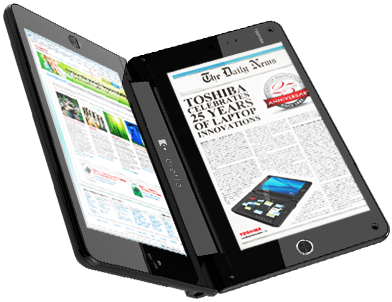

Operating system
Genuine Windows® 7 Professional 32
Processor
Intel® Atom™ Processor Z540 (1.86 GHz, 512 KB L2 cache, 533 MHz FSB)
Weight Starting at 1.5 lb (Starting at 0.68 kg)
Dimensions (w x d x h)
9.21 x 0.58 x 5.91 in (23.40 x 1.47 x 15.00 cm)
Memory, maximum
2 GB 800 MHz DDR2 SDRAM
memory operates at the maximum system supported speed of 533 MHz
Storage Internal drive
Solid State Flash Module Up to: 64 GB
Optical drive External USB 2.0 CD/DVD R/RW
Graphics Display 8.9" diagonal WSVGA wide-viewing angle touchscreen (1024 x 600 or 1024 x 768 for some applications)
Graphics Intel Graphics Media Accelerator 500
Broadcom Crystal HD Enhanced Video Accelerator
Expansion features Ports 1 USB 2.0
1 combo stereo headphone/mic jack
1 integrated microphone
1 power connector/HP Slate Cradle connector
Slots 1 Secure Digital
Audio High Definition audio; Integrated stereo speakers; Integrated microphone; Combo stereo headphone/mic jack
Integrated camera Integrated 3 MP camera (outward facing); Integrated VGA webcam (inward facing)
Input devices HP Slate Digital Pen
Wireless Integrated 802.11b/g/n + Bluetooth 3.0 + HS combo
Power and operating requirements
Battery life up to 5+ hours
Software installed HP Slate Camera, EVERNOTE, HP Support Assistant, Adobe Reader, Adobe PDF
* 802.11a/b/g/n Wi-Fi, 3G/4G data and Bluetooth 3.0 help employees stay connected on and off-campus
* HD video (720p) with Cisco TelePresence solution interoperability for lifelike video communication with the simplicity of a phone call
* Virtual desktop client enables highly secure access to cloud-based business applications
* Android operating system, with access Android marketplace applications
* Collaboration applications including Cisco Quad, Cisco Show and Share, WebEx, Presence, and IM
* HD audio with wideband support (tablet, HD Soundstation)
* 7” diagonal, high-resolution color screen with contact-based touch targets delivers an elegant, intuitive experience
* HD Soundstation supports Bluetooth and USB peripherals, 10/100/1000 wired connectivity and a handset option
* Detachable and serviceable 8-hour battery for a full day of work
* Highly secure remote connections with Cisco AnyConnect Security VPN Client
 Features
* Full computing power in a tablet format
* 1 GHz dual-core processor
* 1 GB RAM
* Symmetric multi-processing
Web without limits
* Ideal for games, media, apps and everything the real Internet offers
* Full Adobe® Flash® 10.1 enabled
* Built-in support for HTML 5
* No-compromise, beautiful rendering of text, graphics and video
* Push technology
* Email, calendar, BBM™, tasks, documents and more
* BlackBerry security and data efficiency
BlackBerry Tablet OS
* Powerful, user-friendly QNX technology:
it's what the World Wide Web runs on
* True multitasking
* Proven mission critical reliability
Video conferencing
* Crystal clear HD display
* Rich stereo sound
* Dual HD video cameras
Best-in-class media
* 3 MP high definition forward-facing camera
* 5 MP high definition rear-facing camera
* Codec support for superior media playback, creation and video calling
* 1080p HD video; H.264, MPEG4, WMV HDMI video output
* Micro USB and Micro HDMI
Ultra portable, super convenient
* 7" LCD display, 1024 x 600 screen resolution
* 5.1" x 7.6" x 0.4" (130mm x 194mm x 10mm)
* 0.9 lbs (400g)
* Built-in Micro USB connector
* Multi-touch capacitive screen
* Wi-Fi® 802.11 a/b/g/n
CIO & enterprise ready
* Out-of-the-box compatibility with BlackBerry® Enterprise Server
* Seamless pairing for a secure window into your BlackBerry® smartphone
* 3G access via existing BlackBerry smartphone service plan
* Corporate data access
* Secure and manageable
Bundled OS: Windows (7)
Display
* Screen size: 11.6 inches
* Screen type: LCD (Active, Color, Backlit, LED)
Processor
* Processor make:Intel
* CPU model: U4100
* CPU family: Core2 Duo
* Touchscreen: Yes
Networking
* WiFi: 802.11 b, g, n
* WiFi encryption: WEP, WPA, WPA2
* Ethernet: 10/100/1000 [Gigabit]
* Mobile broadband (3G): Yes
* Video outputs:HDMI, VGA
Storage details
* Storage interface: SATA
* eSATA: Yes
Memory and storage (basic)
* Hard drive(s): 16 GB (total)
SSD / integrated
Input
* Keyboard:Yes
* Pointing device: Trackpad
Connections
* USB: 2.0 (3 ports)
* Bluetooth: 2.1 + EDR
 Additional specs
Network GSM 850 / 900 / 1800 / 1900
3G, HSDPA 900 / 1900 / 2100
Released 2010, October
Dimensions 190.1 x 120.5 x 12 mm
Weight 380 g
Display Type TFT capacitive touchscreen, 16M colors
Size 600 x 1024 pixels, 7.0 inches
- Gorilla Glass display
- TouchWiz UI
- Multi-touch input method
- Accelerometer sensor for UI auto-rotate
- Three-axis gyro sensor
- Touch-sensitive controls
- Proximity sensor for auto turn-off
- Swype text input
Sound Alert types Vibration; MP3, WAV ringtones
Speakerphone available, with stereo speakers
- 3.5 mm audio jack
Unlimited Memory Phonebook entries and fields, unlimited Photocall
Unlimited Call records
Internal 16/32 GB storage, 512 MB RAM
Card slot microSD, up to 32GB, buy memory
Data GPRS available ~ EDGE available
3G HSDPA, 7.2 Mbps; HSUPA, 5.76 Mbps
WLAN Wi-Fi 802.11 b/g/n
Bluetooth available, v3.0 with A2DP
Infrared port No
USB available, v2.0 (proprietary)
Camera Primary 3.15 MP, 2048x1536 pixels, autofocus, LED flash
Features Geo-tagging
Video available, 720x480@30fps
Secondary available, 1.3 MP
Features OS Android OS, v2.2 (Froyo)
CPU ARM Cortex A8 processor, 1 GHz processor; PowerVR SGX540 graphics
Messaging SMS(threaded view), MMS, Email, Push Mail, IM, RSS
Browser HTML
Radio No
Games available
Colors Black and Grey
GPS available, with A-GPS support
Java available, MIDP 2.1
- Social networking integration
- Digital compass
- Full HD video playback
- Up to 7h movie playback
- TV-out
- MP4/DivX/WMV/H.264/H.263 player
- MP3/WAV/eAAC+/AC3/FLAC player
- Organizer
- Image/video editor
- Thinkfree Office (Word, Excel, PowerPoint, PDF)
- Google Search, Maps, Gmail,
YouTube, Calendar, Google Talk, Picasa integration
- Readers/Media/Music Hub
- Adobe Flash 10.1 support
- Voice memo/dial/commands
- T9
Battery Standard battery, Li-Po 4000 mAh

Just in time for summer movie season, RealD Inc. announced today that kid-sized RealD 3D glasses will be available nationwide in the USA and Canada beginning June 18th at theatres showing Disney PIXAR’s “Toy Story 3.” Sealed in individual packaging to ensure they are sanitary and quality assured, kid-sized RealD 3D glasses are smaller versions of standard RealD 3D cinema glasses and designed to fit children 8 years of age and under. Kid-sized RealD 3D glasses are already available in select international markets.
“Kid-sized RealD 3D glasses are made to the same high-quality standards as adult size RealD glasses with each individually packaged in sealed bags ensuring they are clean and fresh for every moviegoer.”
“The little ones will be able to comfortably enjoy the great summer movies coming out in RealD 3D wearing glasses designed just for them,” said Joseph Peixoto, President of Worldwide Cinema at RealD. “Kid-sized RealD 3D glasses are made to the same high-quality standards as adult size RealD glasses with each individually packaged in sealed bags ensuring they are clean and fresh for every moviegoer.”
The one-size-fits-all idea really didn’t work that well. In fact, I have a pretty big head when it comes to hats and glasses, but I find the regular RealD glasses to be rather big. On kids they look like goofy novelty glasses.

Motoblur enhances social networking by pushing content in real time to the user — such as through Facebook, Twitter or RSS feeds — and aggregating it in card-like windows, without the need for opening a separate application.
Moreover, Motoblur backs up your data to a Motorola-hosted cloud, allows you to track a lost phone using GPS and even allows you to remotely wipe the device.
THE ADVANTAGES
Smartphones are perhaps the most intimate of electronic devices and a boon to marketers everywhere. They record our conversations, trace our movement, mimic our reading habits, discern our music tastes and monitor our usage habits throughout the day. They know what things we like to read, who we like to talk to, what we like to listen to, what games we like to play and where we spend our waking hours.
Such data harvesting has never been possible up until just a few years ago, and the expansion of social media means people are increasingly open to offering such information without thinking twice about it.
While the current Motoblur is social networking-focused, don’t let that fool you. While you’re aggregating data from elsewhere, Motorola is aggregating data from you. In effect, Motoblur is the key to Motorola’s customers, and serves as the platform through which the company can tailor its offerings.
The Motoblur services suite transforms Motorola from a purely hardware player to a double threat. By implementing it, Motorola is tapping into the habits of its massive user base to learn from them and adapt to meet user needs.
In one way, Motoblur is a social networking facilitator. In another, it’s a cloud-based security blanket.
But Motorola has said that Motoblur will evolve over time, and is not necessarily just social networking. Perhaps that’s why the company had such immense difficulty explaining exactly what Motoblur was to members of the press and customers — so much, in fact, that Co-CEO Sanjay Jha had to clarify what it was in the wake of the announcement of Android 2.0. (And, to be frank, most folks still don’t get it.)
But that’s because Motoblur is an empty shell for Motorola to fill with services. It’s not just social networking or security because it can do more than that, if the company wills it to. And it will.
Regardless of the details, Motorola already claims hundreds of thousands of Motoblur activations already. That’s important because it demonstrates that Motoblur is, at scale, sending billions of bytes worth of data feedback straight to the company.
To be sure, Motoblur allows Motorola to visually and experientially differentiate itself from other Android competitors such as HTC and Samsung.
But it also allows Motorola to gain valuable insight that could help it keep those consumers hooked.
THE CHALLENGES
Motorola’s initial Android handsets have certainly helped it rekindle its brand recognition among mobile users.
But the challenge facing the company is to ensure that the Motoblur branch doesn’t veer too far from the tree — that is, the main trunk of Google Android development.
While Motoblur serves as a tool that allows Motorola to better adapt to its users, it also serves as a hindrance when its users are suddenly left behind the rest of the Android ecosystem.
Like rival HTC with its Sense UI, Motorola’s Motoblur depends on in-house software development on top of existing Google Android development. Last year was indicative of the troubles this could potentially cause: in exactly one year’s time, Google Android catapulted through several versions from version 1.0 to 2.1.
While plain Google Android installations on the T-Mobile (HTC) G1 and T-Mobile myTouch 3G allowed those handsets to upgrade as soon as Google released the new version of its operating system, handsets like the Cliq (1.5) and HTC’s Hero (1.5) were left behind, missing new must-have features until Motorola developers processed the new release.
 Motorola has unveiled their latest creation, the squarish Flipout. Doing exactly what the name describes (boasting a squished, slide-out QWERTY keyboard), the Android 2.1-based mobile device has a special focus on social networking with enhanced Motoblur technology.
Motoblur, the company’s signature technology paired with Android OS, offers direct access to popular programs like Facebook, Twitter and last.fm straight from the home screen. Speaking of the main menu, users can customize up to seven home screens with live wallpaper on top.
Some of the other notable specs include a 3-megapixel camera, Bluetooth v2.1, Google apps (Gmail, Maps, etc.) and Adobe Flash support. For those who actually plan to talk more than they text, the Flipout also boasts CrystalTalk PLUS, which should work to reduce the amount of background noise when yapping on the phone.
The Flipout will be available in seven tasty shades: Licorice, Fairway Green, Raspberry Crush, Brilliant Blue, Poppy Red, Saffron or white. Given the vibrant choices, geometric package and enhanced social networking support, it strikes me as something targeted towards youth. And it might be just me, but doesn’t it remind anyone else of another recently released mobile device? Although, with Motoblur’s strong security features (auto data wipe for lost/stolen handsets plus auto back-up) and the point about access to corporate e-mail accounts, Motorola seems to be aiming at a slightly older age group.
The Motorola Flipout will be hitting European shores starting in the second quarter of 2010. No word on a release plan anywhere else yet. Until then, you can check out the promo video and see if this is something worth salivating for or not.
 Asustek Computer Chairman Jerry Shen revealed a new Android based tablet that will be referred as Eee Pad. The Eee series of netbooks is likely the most renowned line of netbooks. ASUS was the manufacturer that made netbooks famous and put them on the map. The company would now use the Eee branding to sell their forthcoming Android powered tablet.
Shen says that Asus will start production on Android based tablet as soon as possible, and expects to compete with Apple’s iPad. ASUS will officially shows off the Eee Pad, at Computex 2010, a well-known computer expo, in June. While the release of the Eee Pad is expected the end of July.
Forbes reported in March that several tablets are on the way from Asus.
"Eee" is the name for the company's consumer devices, which include the original Netbook, the EeePC, and has been extended to a number of computers like the EeeTop, an all-in-one desktop PC.'
There are no official spec sheet rolled out yet, however we see the Eee Pad will runs Android OS and have an Nvidia Tegra processor, considering that it uses lesser resources compared to Windows 7. In order to compete with Apple’s iPad, it will also have a number of features that the iPad doesn’t, such as USB, integrated webcam, as well as Adobe Flash. The new Eee Pad is expected costs around US$ 479 to US$ 510.
Android-based tablets aimed at providing competition for Apple's iPad have been talked about a lot, but few have actually begun shipping. Archos released one last year, and on Thursday Engadget got its hands on some internal Dell documents that show a 7-inch Android and Tegra-based tablet the company is apparently planning to release in November.

Amazon.com soon will release a free Kindle for Android application sometime this summer.
Kindle for Android allow users to browse and read from over 540,000 books in the Kindle Store.
Kindle for Android features Amazon's Whispersync technology, which saves and synchs a user's bookmarks across their Kindle, Kindle DX, iPhone, iPod touch, iPad, PC, Mac, and BlackBerry.
"Kindle for Android is the perfect companion application for Kindle and Kindle DX owners, and is also a great way for customers to enjoy over 540,000 books in the Kindle Store even if they don't yet have a Kindle," said Jay Marine, director, Amazon Kindle.
Amazon announced the launch of its official iPad app today. It's now available in Apple's App Store.
"Following the launch of the Amazon App for iPhone and iPod touch, we've used our customers' feedback to help us build a fun and intuitive shopping destination on the iPad," says Director of Amazon Mobile Sam Hall. "This application offers customers a unique, interactive experience that takes full advantage of the visual and tactile nature of the iPad."

Features
- Purchase using Amazon's 1-Click ordering and Amazon PrimeThere is no doubt that this will be one of the most popular apps on the iPad. Most people who purchase items online and own iPads are most likely going to download this one.
- Track packages or modify orders using the Your Account feature
- Receive personalized recommendations
- View editorial and customer reviews
- Browse Amazon's Bestsellers, Gold Box Deal of the Day and Lightning Deals
- Access Wish List and Universal Wish List
- Watch movie trailers and listen to song samples
 Amazon said today(1st June) its Kindle App for iPad is now available in all countries where the device is sold.
The move by Amazon comes as Apple today launched its iPad internationally in Australia, Canada, France, Germany, Italy, Spain, Japan, Switzerland and the UK.
Amazon says the Kindle for iPad app will complement its Kindle reader, offering its synchronization technology of books across a number of Kindle apps, and an interface designed for the look and feel of the iPad.
"We're thrilled to make Kindle for iPad available to readers around the world," said Jay Marine, director, Amazon Kindle. "Kindle for iPad includes all the features customers love about Kindle for iPhone, including great selection and synchronization of their books across a variety of Kindle apps, along with a beautiful new user interface tailored to the look and feel of iPad."
It's really no surprise that Apple's iPad is selling like hotcakes; it's simply a fantastic device!
I've owned one for well over a month now and to get mine I had to pay almost double the price. It's not that I'm a fanatic about it but, at the time, I was contemplating buying an ebook reader device (The Kindle actually). I like to read, a lot, but don't like the fact that my books require trees to print on them, so I decided to go digital (plus - in the long run - I'll save hundreds if not thousands of dollars on books).
Once I learned that iPad offers the same downloads as the Kindle AND it's much like a Touch but bigger and more powerful, all for almost the same price as the Kindle, I just jumped on it.
Sure there are a few details to work out with the iPad - but that's like any other new electronic - I still recommend it to anyone who likes to surf the web on-the-go, it's simply a must have.
With spring models finally rolling out and no big trade shows on the horizon until the fall, now is a good time to take stock of what your digital camera dollar will buy. Check out our list of the Top 10 compact digital cameras on the market today.
1. Panasonic Lumix DMC-ZS7
2. Panasonic Lumix DMC-TS2
3. Canon PowerShot S90

 Sony has already come out with a follow-up to the Sony Cyber-shot DSC-TX1, but while the DSC-TX7 is a fine update (I especially like the TX7’s wider lens), at its current price of $400 there are frankly better options for the money. The TX1, on the other hand, has benefited from an $80 price drop. While it’s still no bargain, this popular ultracompact shooter is a better value than most. I’m usually not a big fan of the super-slim ultracompact cameras, because they typically sacrifice image quality for size and sex appeal. But the TX1 delivers surprisingly decent shots, even in low light (thanks to its use of Sony’s superior backside-illuminated Exmor R CMOS sensor). Plus, features like its nearly effort-free Sweep Panorama mode and intuitive touch-screen menu system are so well implemented that it’s hard not to love this camera.
 2009 was a good year for Panasonic–the Lumix DMC-ZR3 is yet another update to a strong contender from last year. Unlike the ZS7 and TS2 above, however, the ZR3 is merely an incremental update to last year’s innovative DMC-ZR1. In fact, I might even opt for the ZR1 over the ZR3 if you can find it at a good discount, but since the price difference between the two cameras is slight (and the ZR1 is getting harder to find), I decided to include the ZR3 here. Like its predecessor, the ZR3 packs an impressive 25-200mm equivalent, f/3.3-5.9 8x zoom lens into a tiny package that’s barely an inch thick by using a specially designed 0.3mm thin aspherical lens. And while the bump from 12 megapixels up to 14 megapixels is nothing to write home about, I do like the new video features, including the ability to record HD video in AVCHD Lite format as well as Motion JPEG HD-quality video, and the inclusion of a dedicated video record button and a mini-HDMI port.
 When I first saw this camera last year, I thought its inclusion of front-side 1.5-inch LCD (in addition to the big wide-aspect touchscreen on the back) was gimmicky but clever, and most importantly, well-implemented. I still don’t see it as a must-have option, but the Samsung DualView TL225 deserves to be on this list with or without the additional screen. Take the aforementioned wide touchscreen, for instance. Not only is it nice and big at 3.5-inches, but with a 1,152,000-dot resolution, it’s truly a pleasure to look at. Additionally, the camera takes full advantage of the touchscreen, allowing you to access an intuitive menu system through point-and-swipe gestures as well as tilting motions powered by an internal accelerometer to make menu selections. Another nice touch (no pun intended) is that you can set the camera to provide haptic vibration feedback when the touchscreen registers your choices.
 Like the DSC-TX1, a nice price drop has helped make the Cyber-shot DSC-WX1 a competitive offering in a lower price range. When it first came out last fall, the WX1 was lauded for delivering relatively good low-light performance in a very compact package by using the same backside-illuminated Exmor R CMOS sensor as its ultracompact sibling, the TX1. Though it’s not as sleek in design as the higher-priced TX1 — and includes a 2.7-inch standard LCD as opposed to the TX1’s 3-inch touchscreen — the WX1 features a brighter, wider, and longer lens (24-120mm equivalent, f/2.4-5.9) as well as the easy-to-use Sweep Panorama mode and 720p HD video recording.
 Just because your budget is tight doesn’t mean you can’t get a camera that will take excellent photos. The Canon PowerShot A490 lists for just $110 (and you can find street prices of under $100), achieving the low price by limiting some features — for example, it uses only a 5-point autofocus system, includes fewer scene modes (13) than its higher-end brethren, and its 2.5-inch 115,000-dot LCD is smaller and lower-resolution than most of today’s current cameras (including the Nikon L22’s 3.0-inch, 230,000-dot screen). And like the L22, it uses AA batteries. But, as you can see from the gallery of sample photos linked below, the A490 doesn’t scrimp on image quality. In fact, the A490 probably delivers the best image quality you’ll find in a comparably priced camera, so if you’re not as concerned with bells and whistles (and fancy colors since the A490 only comes in silver), this is one of the best values you’re going to find.
 The entry-level Nikon Coolpix L22 is a budget friendly 12-megapixel shooter with a 37-134mm equivalent 3.6x optical zoom lens. Despite its $130 price tag, the L22 offers up a large 3.0-inch LCD as well as three-way image stabilization and ISO 1600 capability. There’s an Easy Auto mode with an automatic scene selector (with only six scene modes), and the camera is also powered by AA batteries, which is convenient in a pinch, though I’d recommend investing in a set of NiMH or Lithium rechargeables after the included alkalines run out.

Symantec said today it is introducing a new security initiative called "Norton Everywhere" aimed at protecting any Internet connected device.
As part of its Norton Everywhere initiative Symantec is launching Norton Smartphone Security Beta for Android in June. The new mobile application will give users the ability to remotely lock or erase data from the device via text if it is lost.
Janice-Chaffin-Symantec "We are entering a new era where non-PC devices are exploding in numbers, which means more opportunity for cybercriminals. It's becoming more and more critical for consumers to be protected beyond their PCs," said Janice Chaffin, President Consumer Business Unit, Symantec.
"The Norton Everywhere initiative takes a broad view of how Norton can deliver trust and high value to consumers and address evolving market needs. Symantec's breadth of resources, partnerships, global reach and brand recognition make it uniquely able to deliver security and more to any Internet-connected device in the world."
Also being released in June is Norton Connect Beta, a free mobile app that can access files archived via Norton Backup from a users iPhone, iPad or Android device.
Norton DNS has been designed to provide a safer, more reliable, and faster Internet experience by offering a variety of basic protection services like antiphishing, antimalware and anti-spyware via Norton verified web filtering.
A new mobile website m.Norton.com is now available to mobile users to acces news, videos and downloads from Norton. The new site is available in English and will be available in German and Japanese in June.

We have been seeing that every time a new iPhone is released, the price tag of the previous-gen model drops down drastically. When iPhone 3GS came out, 3G price was dropped to $99. And now according to fresh reports Walmart as of today has officially dropped iPhone 3GS price down to just US $97 on two years contract. Apple has also stopped shipping the iPhone 3G 8GB units to AT&T stores and further orders are not being taken anymore. This, if anything, are clear signs of the arrival of new iPhone, the iPhone 4G / HD.
iPhone 3GS
Morgan Stanley in another report also expects Apple and AT&T to drop the price of the base model of iPhone 3GS down to $99 once the next iPhone is announced on June 7 at WWDC. This year’s WWDC will kick off with Steve Jobs keynote who is expected to announce the new iPhone, iPhone OS 4 and maybe a sneak peak at the next version if Mac OS X. Stay tuned as we will bring you all the details from the conference come June 7.
Jobs said "..I am sure that we are making the correct decision to lower the price of the 8GB iPhone from $599 to $399, and that now is the right time to do it. iPhone is a breakthrough product, and we have the chance to 'go for it' this holiday season. iPhone is so far ahead of the competition, and now it will be affordable by even more customers. It benefits both Apple and every iPhone user to get as many new customers as possible in the iPhone 'tent'. We strongly believe the $399 price will help us do just that this holiday season.
Second, being in technology for 30+ years I can attest to the fact that the technology road is bumpy. There is always change and improvement, and there is always someone who bought a product before a particular cutoff date and misses the new price or the new operating system or the new whatever. This is life in the technology lane. If you always wait for the next price cut or to buy the new improved model, you'll never buy any technology product because there is always something better and less expensive on the horizon. The good news is that if you buy products from companies that support them well, like Apple tries to do, you will receive years of useful and satisfying service from them even as newer models are introduced.
Third, even though we are making the right decision to lower the price of iPhone, and even though the technology road is bumpy, we need to do a better job taking care of our early iPhone customers as we aggressively go after new ones with a lower price. Our early customers trusted us, and we must live up to that trust with our actions in moments like these.
Therefore, we have decided to offer every iPhone customer who purchased an iPhone from either Apple or AT&T, and who is not receiving a rebate or any other consideration, a $100 store credit towards the purchase of any product at an Apple Retail Store or the Apple Online Store. Details are still being worked out and will be posted on Apple's website next week. Stay tuned..."

Yesterday Apple overtook Microsoft as the world’s most valuable technology company. According to the New York Times, Apple shares are now worth $227.1 billion versus a measly $226.3 billion for Microsoft, You may think Apple is winning because Apple’s products are better.  You may even think Apple is winning because Apple’s marketing is so great. HOWEVER, the truth is that Microsoft made a series of strategic blunders that have blunted it’s once-unassailable market position, giving Apple the opening it’s needed to push past.
Apple is now doing so well that it has to explain to the government why it’s so handily beating its opponents, while Microsoft is now so embarrassed at being surpassed in market cap that it has to explain to its shareholders what it plans to do to right the ship. But while the answer to how Apple managed to grow larger than Microsoft is fairly straightforward, it’s not the answer that immediately comes to mind: sure, Apple’s diversification into everything from music players to cellphones to music sales to tablets has given the company a wider revenue base upon which to capitalize. But Microsoft has also moved into every one of these markets and failed each time, so it’s not as simple as the fact that Apple has broadened its product line. Why is it that the iPod worked and the Zune didn’t? Is it because the iPod came first and cornered the market before the Zune got out the door? If so, then how does one explain the dominance of the iPhone over Windows Mobile phones, when the latter have been around longer? And how about the iPad? Microsoft has wanted to go there for what seems like a decade, and then newcomer Apple steps in and steals the whole market?
Microsoft’s original strategy in the eighties and the nineties, and a highly successful one at that, was to cater to the technology geeks who made the buying decisions on behalf of the non-geek majority. That meant making sure its products were suitable to the corporate IT geeks who not only directly influenced the buying decisions for their companies, but also indirectly influenced the home purchases of their non-geek coworkers who invariably turned to them for advice. And it meant catering to geek technology pundits, upon whom regular non-geek folks also relied upon for buying advice. And man did it ever work when it came to getting people to adopt not only Windows, which was a geek’s warped vision of what a consumer might want in an operating system, but also Office, which represented such a warped vision that it took the concept of typing words on a screen and hitting the print button, what should have been the simplest (and least expensive) task in all of computing, and instead turned word processing into something that cost hundreds of dollars and involved having nineteen toolbars on the screen.

If you can make OS X run on a Windows netbook, it was just a matter of time before someone found a way to install Android on an iPhone. That day has come.
iPhone Hacker and Dev Team member planetbeing has successfully installed Google’s Android operating system on the iPhone. He even set it up to dual boot Android and the iPhone OS.
In the video planetbeing demonstrates that Android (which appears to be 1.6 or earlier based on the triangular Launcher icon) can boot, make phone calls, receive messages, WiFi, and it appears that several other features are also working. If you’re bored and feel like tinkering this weekend, you can download the system image and documentation.
Things that You Need
1. A first-generation iPhone or an iPhone 3G with firmware versions between 2.0 and 3.1.2, jailbroken with Redsn0w, Blacksn0w, or PwnageTool. If you already updated your handset to 3.1.3 or to a 4.0 beta, you must use PwnageTool to create a jailbroken 3.1.2 .ipsw file to restore down to.
The Spirit jailbreak won't workNote that I am explicitly excluding the iPhone 3GS, all iPod Touch models, and the iPad. This hack will not work with those devices (yet). I am also explicitly excluding iPhone OS 3.1.3 and all of the 4.0 betas. It will not work with the Spirit jailbreak, either.
If you haven't yet jailbroken your iPhone, don't worry--it's a simple process that consists mainly of pressing buttons on the device when prompted and clicking the next button in a wizard. I humbly recommend Redsn0w, since I wrote much of the code for that program.
2. A 32-bit Linux system or virtual machine (I recommend Ubuntu). See "How to Easily Install Ubuntu Linux on Any PC" for instructions if you don't already have Ubuntu.
Although much of the process can be conducted on any machine, one of the tools involved (called 'oibc') has not yet been ported to Windows. In addition, the binaries I provide are compiled on a 32-bit Ubuntu machine.
All of the utilities compile for Linux and Mac, however, so if you're feeling adventurous, compile the sources at github.com/planetbeing/iphonelinux and github.com/planetbeing/xpwn instead of using the binaries.
3. The prebuilt images and binaries; the exact files you use depend on whether you have a first-generation iPhone or an iPhone 3G.
4. The iPhone OS 3.1.2 .ipsw file for your device, namely either iPhone1,1_3.1.2_7D11_Restore.ipsw or iPhone1,2_3.1.2_7D11_Restore.ipsw. Chances are, you already have this file somewhere on your computer, but if you need it, you can download it.
5. The firmware for the Marvell WLAN chip inside the iPhone. Go to the URL, and on the right side of the page you should see a drop-down menu labeled 'Choose your platform'. Select Linux 2.6 - Fedora from the drop-down menu and click the Search button underneath. Download the file labeled SD-8686-LINUX26-SYSKT-9.70.3.p24-26409.P45-GPL. You'll get a file called SD-8686-LINUX26-SYSKT-9.70.3.p24-26409.P45-GPL.zip.


